A OneFS ChangeList Viewer
A blazing-fast, serverless, and fully responsive pure HTML/CSS/JS application to visually browse Dell PowerScale OneFS Changelist API results.
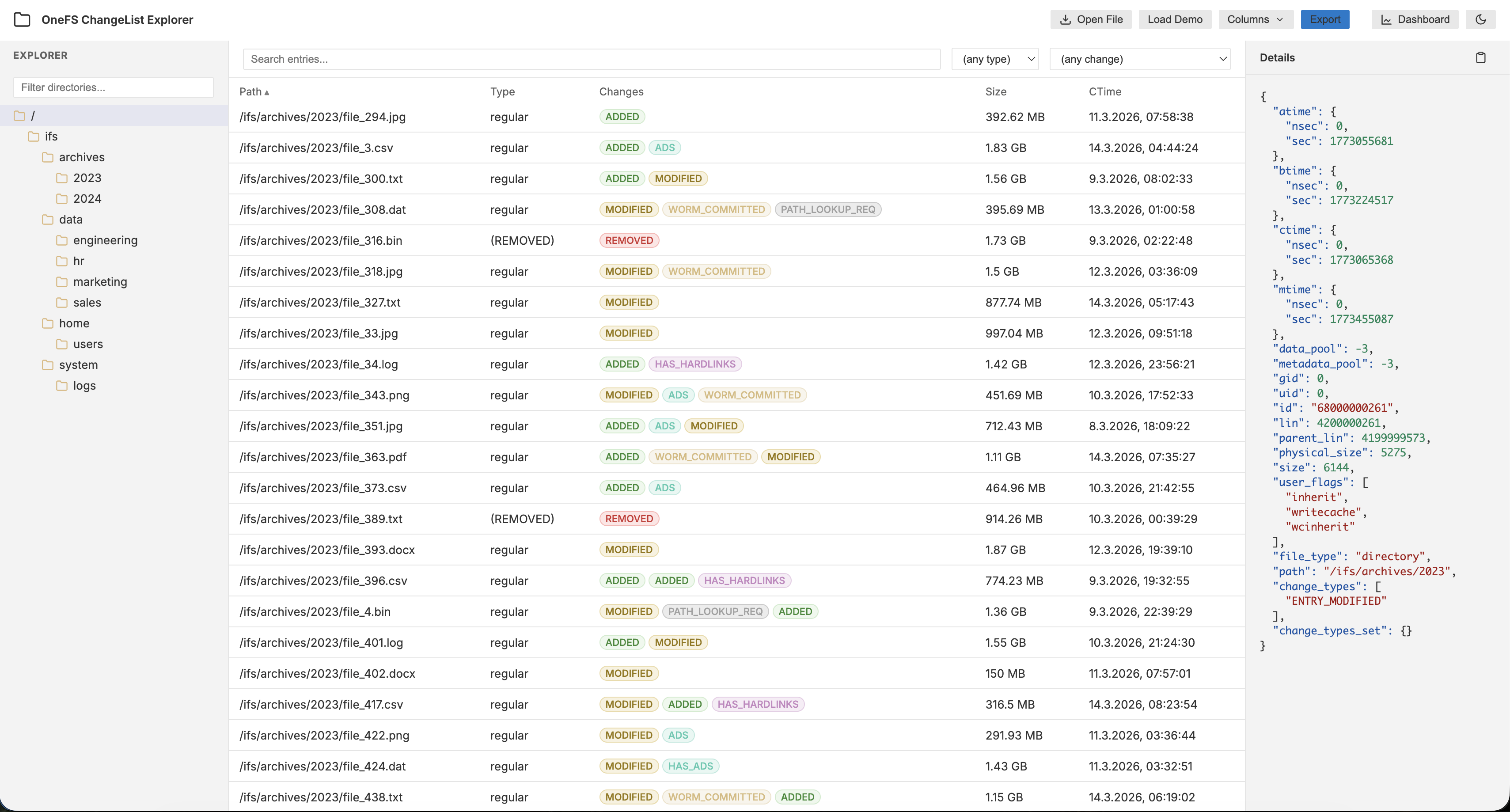
Overview
This tool is a professional-grade explorer for administrators and developers working with the OneFS RESTful API. It takes JSON output from the /10/changelist/<CHANGELIST>/entries endpoint and provides a high-performance interface to navigate directory structures, uncover file moves, and perform deep technical analytics.
Key Features
- Scalable Performance:
- Streaming JSON Parser: Safely ingests files hundreds of megabytes in size using the
ReadableStreamAPI. - Virtual Scrolling: Renders 100,000+ entries with zero lag by only drawing visible rows.
- Streaming JSON Parser: Safely ingests files hundreds of megabytes in size using the
- Advanced Move Detection: Automatically pairs
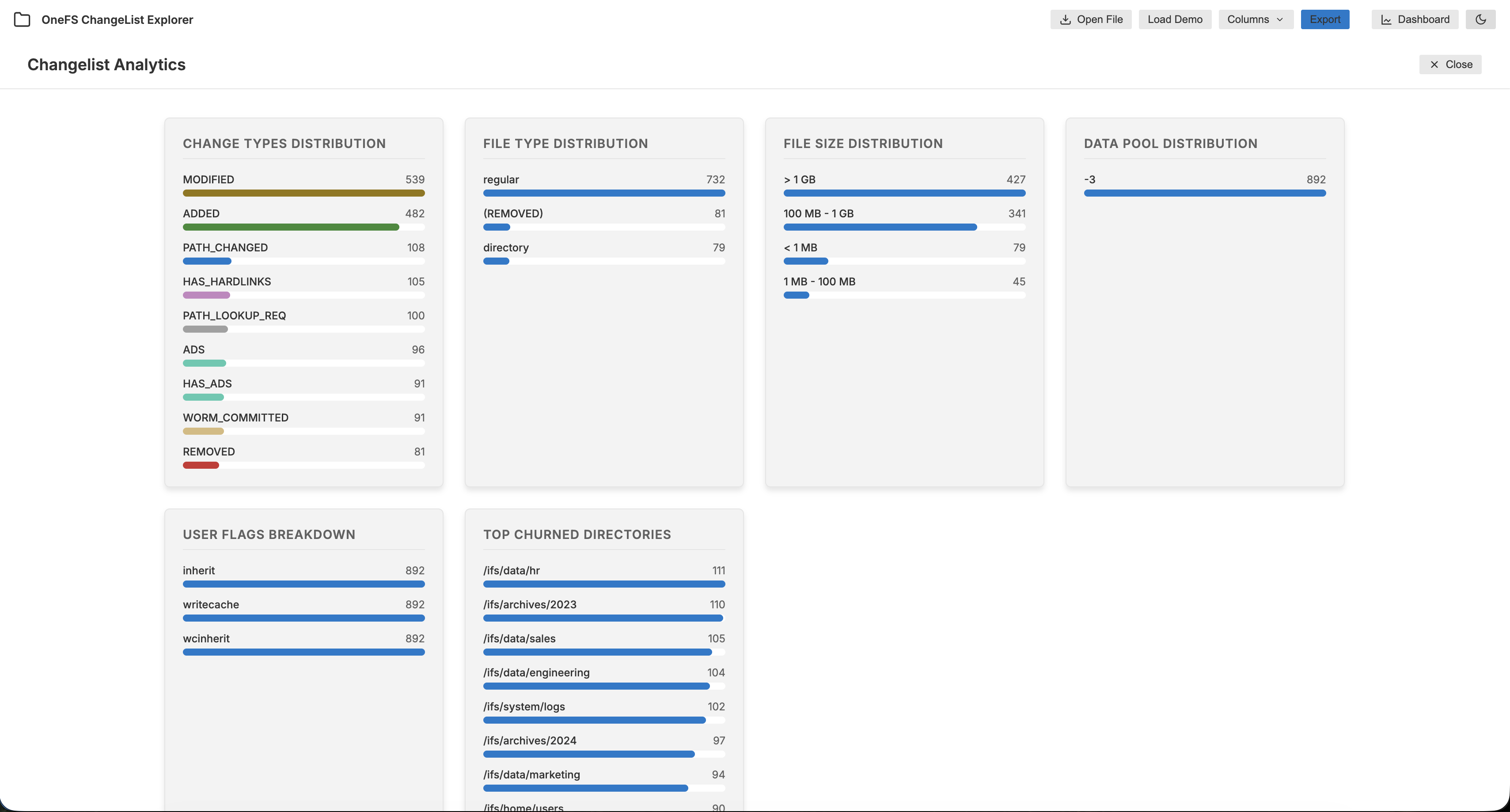
ENTRY_REMOVEDandENTRY_ADDEDevents into interactive “MOVE” records using LIN/ID matching. - Intelligent Analytics Dashboard: Pure-DOM charts for real-time insights:
- Change Type & File Type distributions.
- User Flags Heatmap: Detailed breakdown of individual technical bits/flags.
- Data Pool allocation & Physical Size buckets.
- Hot Directories: Identify where the most churn is occurring.
- Professional Theming: VSCode-inspired Dark and Light modes with theme-aware assets.
- Serverless & Dependency-Free: Zero NPM installs, zero backend. Just pure web technologies.
- Mobile-First Responsiveness: CSS-only slide-in panels for Explorer and Details ensures a premium experience on any device.
- Data Portability: Export filtered views to
.csvor.jsonfor external reporting.
Usage
- Download the source files (
index.html,styles.css,app.js). - Recommended: Serve the directory using a local web server (e.g.,
python3 -m http.server 8000). This is required to load demo files or external JSON URLs viafetch(). - Open
index.htmlin any modern browser. - Load your data via Open File or the Load Demo button.
- URL configuration: You can pre-set the theme and data source via parameters:
?theme=light&data_url=demo.json.
Generating Data from OneFS
To generate a JSON file for this tool, query your cluster:
curl -u <username>:<password> -k \
  "https://<cluster-ip>:8080/platform/10/snapshot/changelists/<CHANGELIST>/entries" \
  > changelist_entries.json
Note: Ensure your REST API user has the appropriate RBAC privileges to query changelists.
Customization
This tool was built to be easily customizable. If you need to add new columns from the API payload:
app.js: Add new column objects to theALL_COLUMNSarray.styles.css: Tweak variables at the top of the file to match your organization’s branding.
Addendum: The “Antigravity” Experiment
I want to be honest here: This is the result of me experimenting with Googles Antigravity. It first started with me trying some explanation I have prepared for customers on our internal Chatbot as well as on M$ Copilot.Which was never intended to generate code - but it did.
Well it produced a prototype that I was able to get working in no time - it was not polished at all and very obviously a quick and dirty stitched together piece of web app. As implied this was never meant to be a „project“ after all.
Now that I heard and read more about antigravity, I thought this is the perfect non-project project to trow at it. The result took me just a few hours of a Friday afternoon, including downloading, installing and exploring the tool. All while I was doing other stuff in parallel.
Especially as I am anything but a Web/CSS developer/designer this would have taken me days otherwise to get even close… it also created the demo data set in no time based on the API spec and a little example from a OneFS Simulator - not very complicated but time consuming.
Now what did I learn? Well nothing really, i still suck with CSS, my Javascript skills are still a bit rusty to say the least (have I mentioned that I am not a web developer?). It actually raised more questions:
- Where do we go from here?
- Do I want to use this more going forward?
- Where are the limits?
- Are there limits?
- Should there be limits?
- Do WE really need or even want this?
At this time I cannot answer any of these questions really. So let me conclude with this: Its an impressive, extremly powerful tool and (a little) scary.